Balenciaga Pants Coupon Applied, Total Unchanged: How to Fix
Marcus Delgado · Editor in ChiefMarcus Delgado is Editor in Chief, covering Air Jordan silhouette history, retail launch timing, size-run fit mapping, and final score calls. They buy at retail where possible and use buying agents otherwise, filming the unboxing and checking the box label against the size tag. Marcus sets the final hands-on score after each ten-day wear block, with testing including 20 km of city pavement and a flex-cycle stress test they conduct personally. They sign off on the comparison table against two prior-year equivalents, connecting fit judgments, wear records, and comparisons.
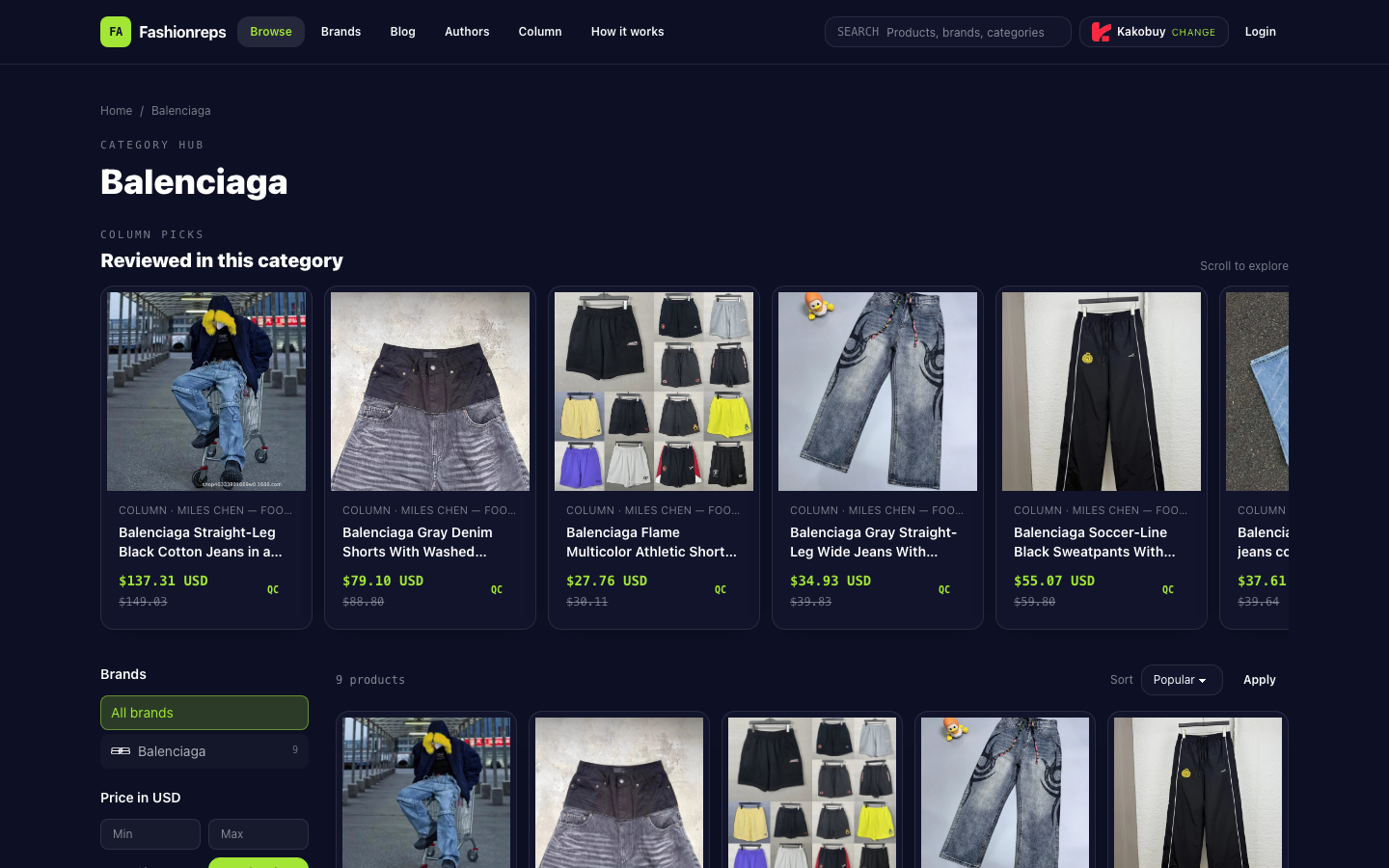
On Fashionreps' Balenciaga pants category page, the listed reference prices and the actual checkout total are separate pieces of information. The page lists items such as black straight-leg jeans, gray denim shorts, colorful athletic shorts, gray flame-print wide-leg jeans, black sweatpants, and white cargo pants, but it does not provide a verifiable coupon code, discount rate, expiration date, or checkout result. Therefor
Editor score 4.2 / 5
On Fashionreps' Balenciaga pants category page, the listed reference prices and the actual checkout total are separate pieces of information. The page lists items such as black straight-leg jeans, gray denim shorts, colorful athletic shorts, gray flame-print wide-leg jeans, black sweatpants, and white cargo pants, but it does not provide a verifiable coupon code, discount rate, expiration date, or checkout result. Therefore, seeing "coupon applied" does not mean the final amount due has decreased.

Image: Illustration showing Balenciaga pants coupon checkout verification. This is an AI-generated illustration and cannot serve as evidence of the actual product, QC, or personal testing. Screenshot content also cannot replace the shopping agent's actual checkout receipt.
First, Separate the Three Amounts
When troubleshooting, do not directly compare the reference price on the product details page with the total on the payment page. At minimum, record the item subtotal, the discounted item amount, and the final amount due after other fees are included.
The item subtotal usually consists of the quantities and unit prices of the products in the order. Service fees, international shipping, currency conversion, and other order charges may be calculated separately. The available source only supports the products and reference prices shown on the Balenciaga category page. It cannot establish how much a particular shopping agent will charge or whether a coupon covers those fees.
Check in Order Whether the Coupon Actually Applies to the Order
- Confirm that the products have been added to the selected shopping agent's order or cart. The Fashionreps page provides an entry point for selecting a shopping agent, but the order, payment, and shipping are handled by the external shopping agent.
- Check the product links, names, colors, quantities, and unit prices in the order. The page examples include black straight-leg jeans, gray denim shorts, and colorful athletic shorts. Do not mistake other products on the category page for the items in the current order.
- Open the coupon's original page or the account's coupon center, confirm that it is still valid, and record all applicable conditions.
- Check whether the coupon applies to the entire order, a specific store, a specific category, or only certain products. The Balenciaga category page itself does not prove that any of the pants automatically qualify for an external agent's coupon rules.
- Check how the minimum-spend requirement is calculated. Confirm whether the threshold is based on the item subtotal or the amount after other discounts are deducted. If the coupon does not explain this, do not make your own assumption.
- Check whether the order details show the coupon name, discount amount, or a separate discount line. When there is only a status message without an amount breakdown, the coupon still cannot be considered verified.
- Temporarily remove other discounts or uncertain products, then check the amount again. This can help identify which item affects the total, but it does not prove that a particular coupon can be combined with other offers.
Compare the Amounts Using Two Checkout Summaries
The most effective approach is to save two order summaries before payment: one without the coupon and one after applying it. Compare each item individually. Do not compare only the listed "original price," "reference price," or discount percentage.
| Check item | Without the coupon | Change to look for after applying the coupon |
|---|---|---|
| Item subtotal | Record the product quantities, unit prices, and subtotal | Confirm whether the subtotal changed because of a product change |
| Discount record | Usually no discount line appears | The coupon name, discount amount, or a clear discount should appear |
| Service fees and other charges | Record the amount shown on the page | Confirm whether a new fee appeared or offset part of the discount |
| Shipping | Record the currency and displayed amount | Confirm whether the coupon explicitly includes shipping; do not assume it does |
| Final amount due | Save the total before payment | A reduction in the total is the only way to confirm that a discount was applied |
If the final amount due is exactly the same before and after "coupon applied" appears, first check whether the discount amount has not refreshed, whether the coupon applies only to the item subtotal, or whether another fee changed. If the order details do not explain why, pause payment and ask the shopping agent for clarification.
Use the Difference to Identify Where the Problem Is
If the item subtotal decreases but the final amount due does not, first check whether the service fee, shipping, currency conversion, or another charge changed at the same time. You cannot simply say the coupon failed, nor can you claim that you saved money.
If the item subtotal does not change, check whether the coupon is merely shown as available in the account, whether it must be selected manually, or whether the products, store, or category in the order are outside its eligible scope. Without the coupon's original terms, the specific reason cannot be confirmed.
If only some products receive a discount, check the product scope and quantities item by item. The different pants styles listed on the category page do not mean they automatically share the same external coupon rules. In particular, do not apply one product's checkout result to other styles.
Do Not Pay When the Information Is Incomplete
If any of the following occurs, save the order summary and contact the shopping agent first:
- The page says the coupon was applied, but there is no discount amount or discount breakdown;
- The item subtotal, discounted amount, and final amount due cannot be reconciled;
- The coupon's expiration date, eligible scope, or minimum spend is not clearly stated;
- Shipping, service fees, or currency conversion details are not fully displayed;
- The order contains different products, making it unclear which items qualify;
- The page says discounts cannot be combined but does not explain which offer should be kept;
- The checkout amount does not match the expected difference.
When contacting support, include the product links, order number, coupon terms page, and checkout summary from before payment. Ask, in order: whether the current products qualify, which amount is used to calculate the threshold, which fees are excluded from the discount, and why the final amount due has not changed. Do not use the category page's reference prices in place of the order receipt, and do not confirm that the discount is active based only on the coupon status message.
Conclusion
The key to determining whether a coupon actually worked is not whether the page says "applied," but whether the order details show an explainable discount and the final amount due after applying the coupon is genuinely lower than the amount without it. The currently verifiable Balenciaga category page supports only the product list, color descriptions, and reference prices. It does not support conclusions about a specific coupon code, discount threshold, expiration date, exclusions, or agent fees. If the change in amount cannot be explained item by item, treat the coupon as unverified, pause payment, and obtain a clear explanation from the external shopping agent.