loewe Image Zoom Issues: Saving Verifiable Info
Marcus Delgado · Editor in ChiefMarcus Delgado is Editor in Chief, covering Air Jordan silhouette history, retail launch timing, size-run fit mapping, and final score calls. They buy at retail where possible and use buying agents otherwise, filming the unboxing and checking the box label against the size tag. Marcus sets the final hands-on score after each ten-day wear block, with testing including 20 km of city pavement and a flex-cycle stress test they conduct personally. They sign off on the comparison table against two prior-year equivalents, connecting fit judgments, wear records, and comparisons.
When Loewe product images on Fashionreps can't be zoomed in, don't immediately treat "unclear images" as a product quality issue, nor judge material, details, or sizing based only on thumbnails. This article addresses one specific task: while image zoom is malfunctioning, save verifiable product information and determine when to continue verification and when to postpone purchase. 🧭 The subject of this article is Fashionreps' Loewe product catalog pages. These pages are used to discover product
Editor score 4.2 / 5
When Loewe product images on Fashionreps can't be zoomed in, don't immediately treat "unclear images" as a product quality issue, nor judge material, details, or sizing based only on thumbnails. This article addresses one specific task: while image zoom is malfunctioning, save verifiable product information and determine when to continue verification and when to postpone purchase. 🧭
The subject of this article is Fashionreps' Loewe product catalog pages. These pages are used to discover products, view product information, and enter selected shopping agents; order, payment, warehouse inspection, and shipping are handled by external shopping agents. This article does not claim that Fashionreps or any specific product page currently has a system malfunction.
Clarify the Image Viewing Issue and the Goal of This Troubleshooting
First record the actual symptoms rather than jumping to conclusions:
- Clicking the image doesn't open an enlarged view, the image stays as a thumbnail, or the enlarged view opens but is blank.
- The image only shows a low-resolution version, making it impossible to discern prints, stitching, collar labels, fabric texture, or other key details.
- Clicking the image redirects to another page, or returning to the catalog loses the product filter state.
- Page text is readable, but the image loading icon keeps spinning or repeatedly fails.
The goal of this troubleshooting is to save four types of information: product source, visible page fields, specific symptoms of the image viewing issue, and still-missing evidence. Until the zoom function recovers, do not write that invisible content is "confirmed to be fine." 🔍
Relocate the Loewe Product Source from the Fashionreps Catalog
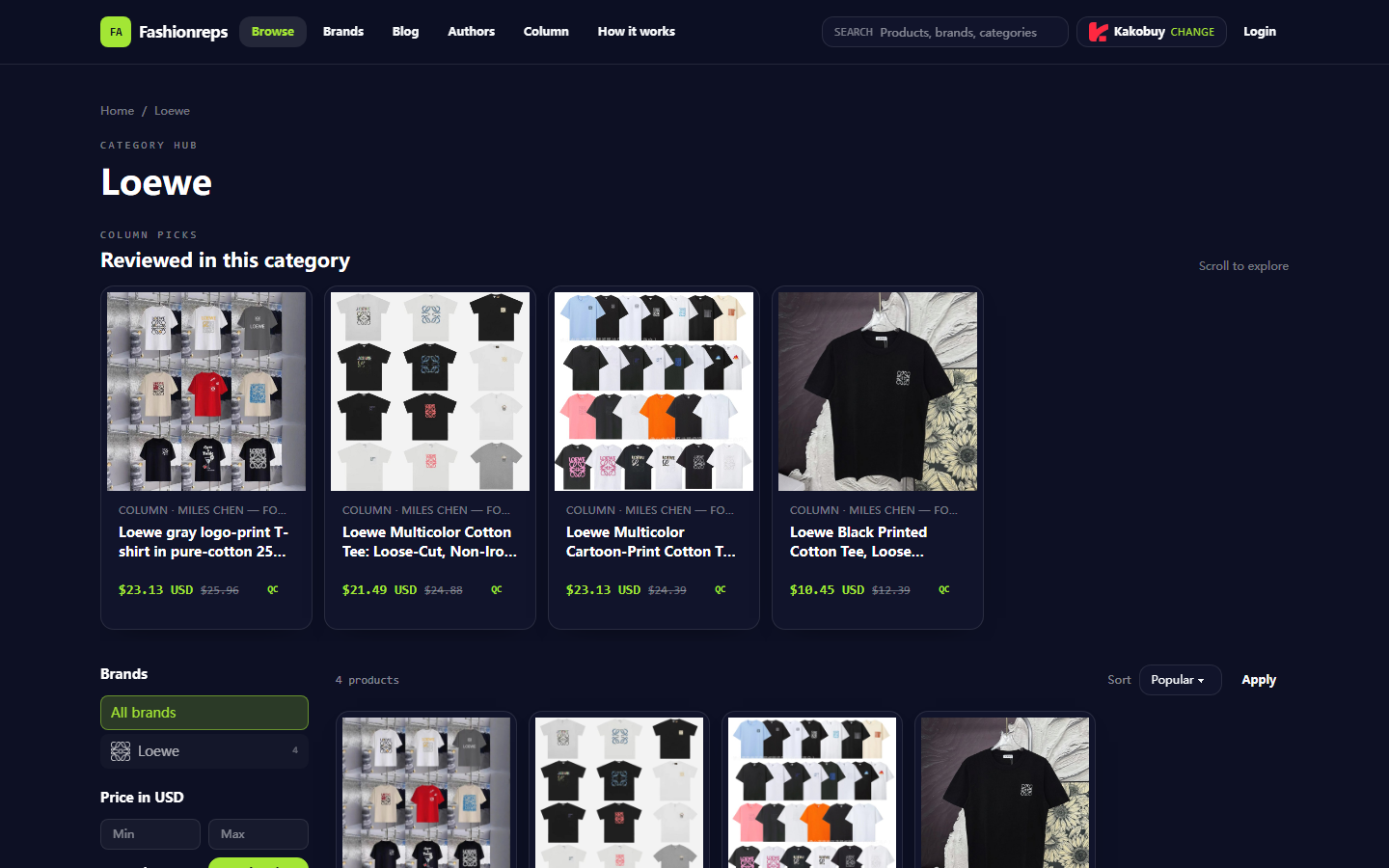
If the product detail page cannot be viewed normally, go back to the Fashionreps Loewe category catalog and relocate the source by product name. Products visible in the catalog include:
- Loewe gray logo-print T-shirt in pure-cotton 250–300g jersey, sizes XS–L.
- Loewe Multicolor Cotton Tee, described as a relaxed fit, no-iron summer pullover, sizes XS–L.
- Loewe Multicolor Cartoon-Print Cotton Tee Collection, described as 100% cotton, relaxed fit.
- Loewe Black Printed Cotton Tee, described as a relaxed crewneck, sizes S–5XL.
Names, reference prices, and filter results in the catalog can only be treated as currently visible information. Reference prices may change over time, by source, or by page state, and cannot substitute for the final quote from an external shopping agent, nor prove inventory or product authenticity. The catalog page screenshot used in this article is shown below; it is used to preserve visible page clues, not to prove the image zoom function or product quality.

When relocating, simultaneously save the product name, category path, page URL, page open time, and the reference price shown in the catalog. If names are similar, distinguish by full title and image order to avoid recording one product's specs under another.
Record Title, Color, Size, Link, and Page Timestamp
Create a separate verification record with at least the following fields:
- Product title: Copy the full name displayed on the page exactly; do not shorten or embellish it.
- Product color: Only record colors explicitly stated on the page; when the image is unclear, do not infer color names from screen colors alone.
- Visible sizes: Record the size range listed on the page, e.g., XS–L or S–5XL; this does not mean a particular size is in stock.
- Product page URL: Copy from the browser address bar; do not manually modify parameters.
- Source category: Record as Fashionreps' Loewe product catalog or corresponding product page.
- Page timestamp: Use local date and time, e.g., 2026-10-21, to record a snapshot of the catalog or detail page.
- Image status: Write "thumbnail visible", "enlarged view blank", "image loading failed", or other actual symptoms.
- Missing evidence: List unconfirmable content such as print details, wash labels, stitching, back view, or localized flaws.
If you plan to consult an external shopping agent or Fashionreps' public help channel, send only the necessary product page information. Do not disclose order numbers, payment information, full shipping addresses, passport details, or complete shipping labels. 🛡️
Check Browser Zoom, Image Loading, and Page Redirect Status
Troubleshoot in the following order to avoid losing page state and filter conditions due to repeated refreshes:
- Reset browser page zoom to 100%, then click the image again. Browser zoom anomalies may cause the image layer to shift position, but cannot be used to conclude that the product image itself is corrupted.
- Refresh the current product page only once, and record the page URL before and after the refresh. If it redirects back to the catalog after refresh, relocate from the catalog title; do not assume it's the same product based on visual position after using the browser back button.
- Check if thumbnails display normally. If thumbnails are also blank, prioritize recording it as an image loading problem; if thumbnails are normal but the enlarged view is abnormal, record it as a viewing interaction problem.
- Temporarily disable browser extensions, reader mode, or content blockers that alter page display, then open the same page to verify. Do not install scripts from unknown sources to forcibly extract images.
- When using browser developer tools or page saving features, only save publicly accessible page information you have permission to access; do not bypass login, access controls, or anti-scraping restrictions.
- Observe whether clicking creates a new tab, redirects to an external shopping agent, or changes category filters. If the page has redirected, save the product title and URL before the redirect before handling the subsequent page.
If the same page still cannot zoom under normal zoom, a single refresh, and no interfering display conditions, record the time and steps when "issue is still reproducible." Do not escalate a repeated interface anomaly into a conclusion that the entire platform is unusable.
Compare Product Details, Thumbnails, and Visible Spec Fields
When images cannot be zoomed, save text evidence and visual evidence separately:
- Text evidence includes title, visible color, size range, page category, and explicitly listed material descriptions.
- Visual evidence includes the thumbnail composition, approximate color distribution, and print position that can actually be seen at present. If clarity is insufficient, note "for locating only, not sufficient to confirm details."
- Invisible evidence includes fabric feel, actual weight, print precision, wash label content, stitching quality, actual measurements, and flaws.
For example, a catalog title may say "pure-cotton" or "100% Cotton", but this only indicates that the page text says so; it cannot prove the actual composition from the title alone. The reference price displayed on the page also cannot prove the final payment amount, shipping cost, taxes, or stock status. 💡
If comparing multiple Loewe products, save separate records for each. Do not copy the same thumbnail, specs, or price to multiple products; when page fields are incomplete, leave blank and mark "not displayed" rather than filling in with information from adjacent products.
Distinguish Displayed Evidence, Temporarily Invisible Content, and Non-Inferable Information
Use a three-tier marking:
Displayed: Product title, category, size range, reference price, and currently discernible thumbnail content explicitly shown on the page.
Temporarily invisible: Image details that should appear after clicking to enlarge but currently fail to display, such as back view, collar label, wash label, close-up prints, and near stitching.
Non-inferable: Physical composition, actual weight, authenticity, stock, seller reputation, final price, shipping time, and after-sales outcome that cannot be proven from the current page.
Only "displayed" content is suitable for writing directly into the current verification summary; "temporarily invisible" content should be reconfirmed after viewing recovers; "non-inferable" content should remain unconfirmed. Do not use expressions like "authentic", "quality guaranteed", "matches physical item", or "flawless" without supporting evidence.
Prepare Information Needed for Help via Visible Channels on the Target Site
If you still cannot view images after basic troubleshooting, prepare a concise help request:
- Full product title and Fashionreps product page URL.
- Date, time, and browser page zoom ratio when the issue occurred.
- Reproduction steps, e.g., "Open product page, click first thumbnail, enlarged view is blank."
- Text fields and thumbnail status currently visible.
- Browser type, device type, and whether the issue repeats in another normal browsing environment.
- Low-risk steps already tried, such as resetting to 100% zoom, single refresh, and temporarily disabling display-altering extensions.
Do not upload screenshots containing personal orders, payment cards, shipping addresses, or identity documents when asking for help. If you must show the page, obscure personal information first, but do not obscure product title, page URL, error messages, and image status needed for assessment. 📋
Fashionreps page states its role is to help users discover products, view source-based shopping guides, and compare third-party shopping agents; purchasing, payment, and logistics are handled by the agent website chosen by the user. Therefore, image viewing issues cannot prove an external agent's payment, warehouse inspection, or shipping capabilities through the page itself. For these aspects, check the actual agent page; do not treat Fashionreps catalog information as an order commitment.
Conditions for Continuing Verification or Postponing Purchase
You may continue to the next verification step when:
- Product page URL and full title have been saved and can be relocated from the Loewe catalog.
- Color, size range, and explicitly stated specs have been recorded separately.
- Image zoom has recovered, or clear public images sufficient to support the next judgment have been obtained.
- Details still not displayed have been listed separately, not substituted with title, price, or thumbnail.
- If purchasing, you have reconfirmed price, stock, shipping, taxes, return/exchange rules, and available warehouse inspection scope on the actual shopping agent page.
Postpone purchase or submission of order to an agent when:
- Product source cannot be reliably located from catalog or detail page.
- Key images remain blank for an extended period, making it impossible to confirm details necessary for purchase.
- There is inconsistency among page title, color, size, or images.
- Page only shows reference price; actual price, stock, or agent quote cannot be confirmed.
- You need to rely on unverified seller promises, third-party screenshots, or untraceable images to proceed.
The value of this approach is not to guarantee product quality, but to reduce misrecording and mispurchase risks caused by invisible images. It is suitable for readers comparing Loewe products, needing to save page evidence, or preparing to seek help from the target site; it is not a substitute for actual order pages, warehouse QC photos, measured data, destination country tax verification, or formal after-sales processes.