RRR123 Catalog Filtering: Use Images, Specs, and Links
Marcus Delgado · Editor in ChiefMarcus Delgado is Editor in Chief, covering Air Jordan silhouette history, retail launch timing, size-run fit mapping, and final score calls. They buy at retail where possible and use buying agents otherwise, filming the unboxing and checking the box label against the size tag. Marcus sets the final hands-on score after each ten-day wear block, with testing including 20 km of city pavement and a flex-cycle stress test they conduct personally. They sign off on the comparison table against two prior-year equivalents, connecting fit judgments, wear records, and comparisons.
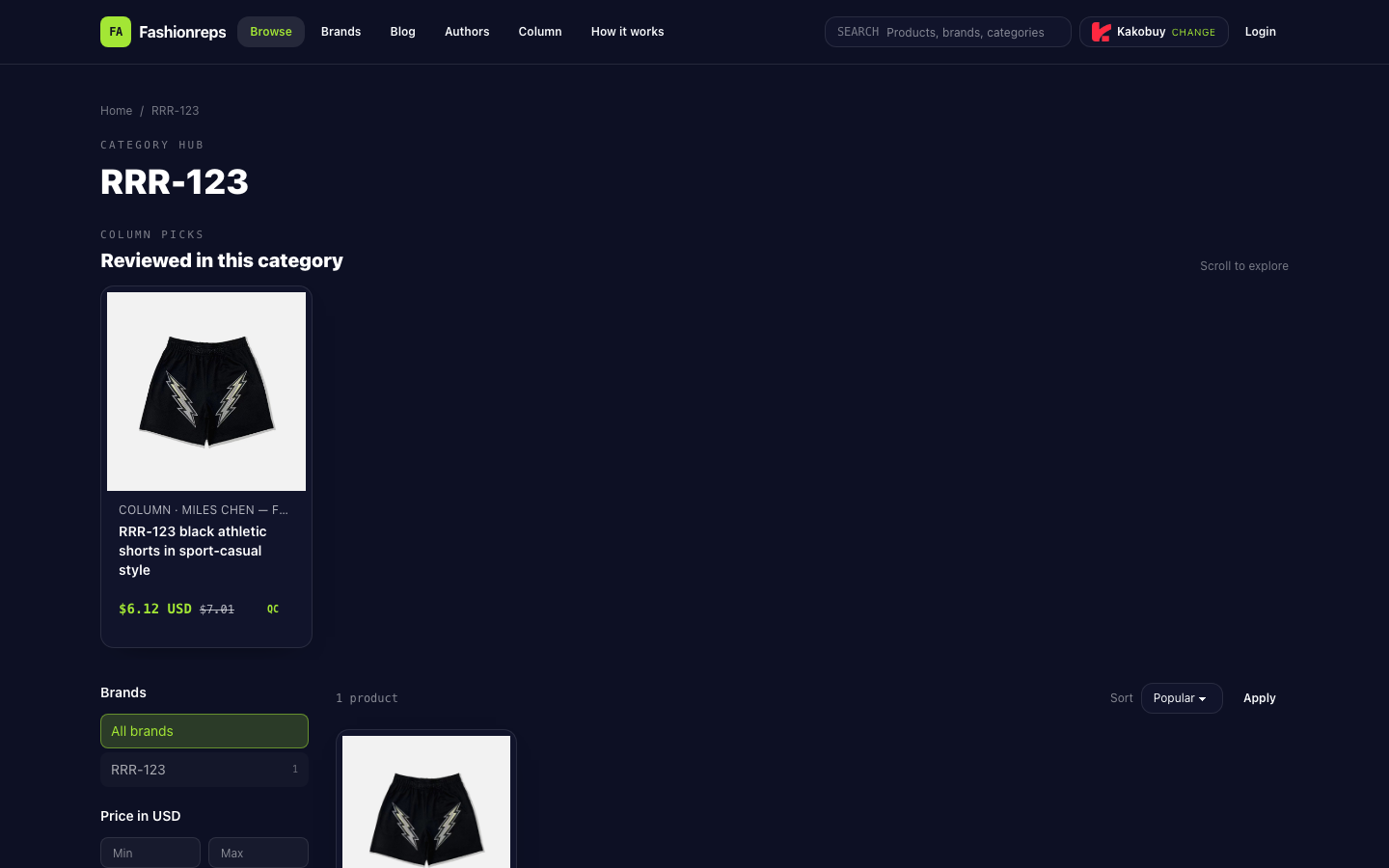
First, Define Your Filtering Goals The first step with the RRR123 candidate catalog is not to log black shorts just because you see them. Instead, decide whether a record has enough evidence to continue verification. For the candidate info currently visible on the RRR‑123 page, the page describes it as a sporty-casual black athletic short, with a reference price of $6.12 and a previous reference price of $7.01. But these fields only show that the page
Editor score 4.2 / 5
First, Define Your Filtering Goals
The first step with the RRR123 candidate catalog is not to log black shorts just because you see them. Instead, decide whether a record has enough evidence to continue verification. For the candidate info currently visible on the RRR‑123 page, the page describes it as a sporty-casual black athletic short, with a reference price of $6.12 and a previous reference price of $7.01. But these fields only show that the page once displayed such a record. They don't prove stock, final price, shipping, or purchase availability on their own.
So, split filtering results into two groups: enough evidence to move to the next verification round, or not enough evidence and must be excluded or put on hold. This avoids mistaking similar images, vague specs, or dead links for the same product.

Image: RRR123 candidate product field record screenshot, not actual item, QC, or hands-on evidence.
Use the Catalog Page to Confirm Candidate Identity First
Website-style catalogs are good for discovery and initial screening. When you enter the RRR‑123 category page, first record the visible category name, product title, color description, and image. Don't just save a short name. The current page shows an "RRR‑123" category entry and lists a black athletic short candidate. The page also provides sorting options: popular, newest, price low to high, and price high to low.
Sorting only helps locate records. It doesn't replace product verification. Popular or low-price order doesn't mean better quality or that the item is in stock. Especially the reference price shown on the page: save it as part of the page record, not as the current purchase price.
During discovery, keep these fields:
- Category: RRR‑123
- Page title: black athletic shorts, sporty-casual style
- Image: save the page image or screenshot, and note the date retrieved
- Color: fill in only the color the page explicitly shows
- Size and specs: leave blank if the page doesn't show them. Don't infer from common sizes.
- Reference price: $6.12; previous reference price $7.01
- Product link: save the original entry link
- QC link: fill in only if it clearly corresponds to this product record
- Status: pending verification, can continue verification, excluded, or link dead
Exclude Wrong Items Using Images and Titles
Image and title must point to the same candidate. If the image looks like shorts but the title says another clothing category, it should not pass. Conversely, if the title says athletic shorts but the image can't confirm style, color, or main subject, mark it as pending verification.
Don't merge records just because they share the color word "black." Different fits, fabrics, pocket structures, or lengths can all use the same color description. The current page offers a text record of black athletic shorts, but doesn't provide full fabric, waist, inseam, or size chart in the given evidence. So those fields should stay blank until the specific product page fills them in.
Then Check Specs and QC Links
After entering the specific product page, check each catalog record against the detail page: Does the product name still point to RRR123? Does the image match the same style? Is the color consistent? Are size and specs clearly stated? Does the link return to that product, not the category home or another item?
QC links need separate checking too. Seeing "QC" on a page doesn't automatically prove a QC link belongs to the current product. Only save a QC link when it clearly corresponds to the product title, image, or specific record.
Stop treating it as a verifiable product record if any of these occur:
- Image and title clearly point to different styles or categories
- Color, size, or other specs conflict across pages
- Product link is dead, or the returned content doesn't match the original record
- Only the category page is visible, so product identity can't be confirmed
- QC link exists, but can't be proven to belong to the current product
- A spec is missing from the page, but someone fills it in using common sense or similar product info
Use Google Sheets for Evidence Filtering
Catalog pages are good for browsing and discovery. Google Sheets is better for putting multiple candidates together, filtering by evidence completeness, and collaborating. The point isn't to compare which loads faster. It's to lock down the basis for judgment, reducing repeated opening and merging records by impression.
You can create an "RRR123 Candidate Verification Sheet" with one row per candidate record. Split "identity evidence," "spec evidence," "link status," and "exclusion reason" into separate columns instead of writing all notes in one long text. This lets you filter rows missing images, missing specs, or with dead links, and makes it easier for another collaborator to review.
| Field | How to record | Pass condition |
|---|---|---|
| Product identity | Title, category, page image | No obvious conflict among the three |
| Color and style | Only copy what the page explicitly states | Descriptions consistent across pages |
| Specs | Size, measurements, or fabric, etc. | Specific page evidence; leave blank if unknown |
| Link status | Product page, category page, or dead | Returns to the corresponding record |
| QC link | Record link and basis of correspondence | Confirmed to belong to current product |
| Filtering conclusion | Can continue verification, pending, or excluded | Clear reason provided |
It's also useful to add "last checked time" and "evidence gap" columns. The former shows when the record was checked. The latter clarifies what to supplement next, like "missing specific product page" or "missing size chart." The time field only indicates when verification was done, not that stock or price remains valid afterward.
A Safer Order of Judgment
First, confirm from the catalog page that the candidate belongs to RRR123. Then open the specific product page to check image, title, and specs. Finally, check links and QC links. Only if these three layers have no obvious conflicts should you change the status to "can continue verification."
If information is incomplete, don't force a purchase conclusion. Keeping a record as "pending verification" or "excluded" with a clear reason is more reliable than filling in uncertain content as definite. Current evidence only supports recording the category, product description, and reference price shown on the page. It cannot determine stock, final price, shipping, actual quality, or purchase outcome.