sp5der Hoodie Multi-Item Cost Check
Marcus Delgado · Editor in ChiefMarcus Delgado is Editor in Chief, covering Air Jordan silhouette history, retail launch timing, size-run fit mapping, and final score calls. They buy at retail where possible and use buying agents otherwise, filming the unboxing and checking the box label against the size tag. Marcus sets the final hands-on score after each ten-day wear block, with testing including 20 km of city pavement and a flex-cycle stress test they conduct personally. They sign off on the comparison table against two prior-year equivalents, connecting fit judgments, wear records, and comparisons.
When preparing to buy multiple sp5der hoodies on fashion-reps, the real first thing to solve isn't "how many items are more cost-effective," but confirming whether each item, service fee, payment fee, packaging method, and subsequent shipping cost all use the same calculation standard. As long as any one of these i
Editor score 4.2 / 5

When preparing to buy multiple sp5der hoodies on fashion-reps, the real first thing to solve isn't "how many items are more cost-effective," but confirming whether each item, service fee, payment fee, packaging method, and subsequent shipping cost all use the same calculation standard. As long as any one of these is still pending confirmation, the reference price on the page cannot be directly taken as the final cost.
This article is for buyers who have already found candidate products and are ready to add them to the cart, but have not yet completed the checkout review. After reading, you should be able to build a line-by-line cost record, distinguish confirmed amounts from pending items, and decide whether to proceed with checkout, adjust quantities, or pause temporarily. It does not apply to refund disputes after payment has been completed, nor does it replace destination country customs or tax regulations.
The Cost Decision to Resolve for This Multi-Item sp5der Order
First, limit the problem to one decision: whether buying multiple items is still worth bearing the uncertainty of combined packaging, service fees, and shipping costs.
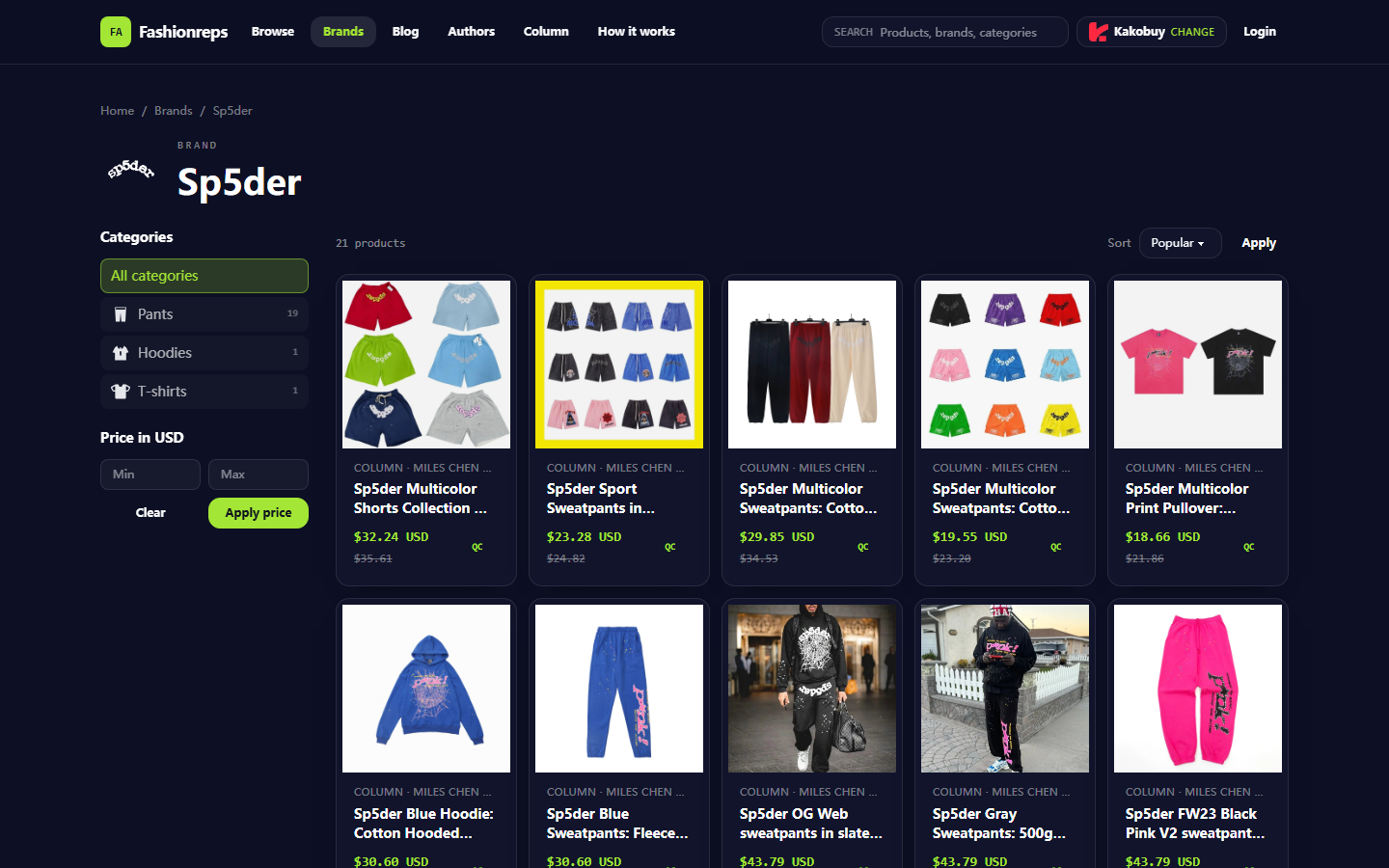
fashion-reps brand page data shows that the Sp5der category includes hoodies, pants, and short-sleeve tops, with the page recording 21 products, among which the hoodie category shows 1 product. The amounts on the page are reference prices and cannot be directly used to infer inventory, final selling price, available discounts, or post-settlement logistics costs.
Therefore, at least the following should be checked separately:
- Whether the selected product is indeed a hoodie, not a similarly named pair of pants or other top.
- Whether the color, size, and product link correspond to the same candidate style.
- Whether the item amount is still consistent with the current page.
- Whether the shopping agent or external checkout page charges additional service fees, payment fees, or handling fees.
- Whether multiple items can be combined for packaging, and whether combining changes the chargeable weight or shipping restrictions.
- Whether the discount has a minimum amount, designated route, designated payment method, or other exclusions.
- Whether shipping costs, exchange rates, and possible destination country taxes are already clear.
🧾 Confirm the calculation standard first, then compare total prices, to avoid writing unrealized savings into the budget.
First Check Each Item's Style, Color, Size, and Link on fashionreps
After opening each candidate product page, record the product name, page link, color, size, and displayed amount separately. Don't just save a screenshot of the cart, because multiple items of the same style or different colorways can easily get mixed up during subsequent checkout.
The Sp5der product names visible in the page data include different colors, fabric descriptions, and fit information. For example, the page records a cotton loose-fit hoodie and also a blue hoodie. They cannot be considered the same product just because of the brand name; they must be confirmed item by item according to the actual page title and options.
For each candidate product, it is recommended to check:
- Whether the title includes hoodie or a clear top description.
- Whether the color option matches the planned purchase color.
- Whether the size range includes the needed size.
- Whether the product page opens normally and displays a clear name.
- Whether the page amount is the current displayed price, the original reference price, or some other historical comparison amount.
- Which external shopping agent or checkout channel the purchase button ultimately leads to.
The reference price on the page can only be used as a starting point for the record. For example, the data once showed some Sp5der products with reference amounts, including different values such as $18.66 and $30.60; these correspond to different products and cannot be substituted for each other, nor can they guarantee that a particular style is still at the same price. 📌 Recheck the product page and checkout page before publishing or placing an order.
How to Build a Line-by-Line Record for Multiple Item Amounts to Avoid Missing Items
It is recommended to put each item on a separate line, rather than adding up all item amounts first and then looking for discrepancies later. A line-by-line record preserves the correspondence between color, size, and unit price, and makes it easier to recalculate when removing an item.
| Cost Item | What to Record for Each Line | Current Status Judgment |
|---|---|---|
| Item Amount | Product name, color, size, page displayed price | Based on the reopened product page |
| Discount Amount | Discount name, threshold, applicable products, and valid conditions | Keep as pending if no clear conditions are seen |
| Service Fee | Fee name, calculation method, whether charged per order or per item | Cannot be inferred from the product reference price |
| Payment Fee | Payment method and additional fees | Do not count as zero before the checkout page shows it |
| Packaging Fee | Costs corresponding to combined or separate handling | Needs confirmation from the agent page or customer service |
| International Shipping | Route, chargeable weight, shipping method, and quote | Keep as pending before a quote is provided |
| Exchange Rate & Taxes | The exchange rate used and potential destination country costs | Cannot be replaced by the product price |
You can use the following simple calculation to check the order:
Item subtotal = Sum of each item amount − Clearly applicable discounts
Estimated order cost = Item subtotal + Confirmed service fees + Confirmed payment fees + Confirmed packaging fees + Confirmed shipping costs
If any item is still unknown, don't fill it in as 0. You can write "pending" and also keep a provisional amount excluding that item. This avoids creating a false sense of precision and reminds you that the final settlement may still change.
How to Confirm Service Fees, Payment Fees, and Packaging Conditions Separately
These three types of fees are often lumped into a single "additional fees" concept, but their trigger conditions may differ.
Service fees may be charged based on the order, number of items, item amount, or a specific purchasing operation. Payment fees usually depend on the chosen payment method and cannot be judged from the USD reference price on the product page. Packaging fees may be related to repackaging, reinforcement, consolidation, or special packaging requirements.
When checking, you can break the questions into three groups:
- Service fees: Are they fixed, percentage-based, or only incurred for specific services?
- Payment fees: Does the current payment method have extra charges, and are they already listed on the page?
- Packaging fees: Is combined packaging automatic, does it require a request, and are there material or handling fees?
Don't treat the platform name in the agent selector as a confirmed quote. The fashion-reps page notes that the buy button leads to an external shopping agent chosen by the user, and orders, payments, and shipping are handled by the agent's website. Therefore, final charges need to be rechecked on the corresponding agent's product page, cart, or checkout page. 🧮 The platform entrance is responsible for product discovery, and the external agent is responsible for specific charges; keep these two calculation standards separate.
How to Compare Combined vs. Separate Packaging Conditions Using Only Page Evidence
Combined packaging is not necessarily cheaper. It may reduce duplicate first-weight or handling costs, but it may also increase package volume, chargeable weight, concentration of package value, and single-loss risk. Separate packaging may increase fixed fees, but it is easier to control when route restrictions, weight limits, or different product handling conditions are inconsistent.
You can record two scenarios side by side:
Combined scenario needs confirmation:
- Whether these items are allowed to be placed in the same package.
- Whether actual weight or volumetric weight is used for billing after combination.
- Whether new packaging, reinforcement, or overweight fees will be triggered.
- Whether the total value or weight of the items exceeds shipping route limits.
Separate scenario needs confirmation:
- Whether each package incurs service fees or fixed shipping costs separately.
- Whether there are multiple first-weight charges.
- Whether different routes or shipping methods can be selected.
- Whether multiple customs clearances or receiving processes will occur.
Currently, there is insufficient data to support giving a fixed savings amount for either scenario. Therefore, the difference can only be calculated after both scenarios have obtained comparable fee details. The savings amount for the combined scenario should be written as: Confirmed cost of separate handling − Confirmed cost of combined handling; unconfirmed items cannot be used in the final conclusion.
How to Verify Discounts, Thresholds, and Exclusions Without Fabricating Savings Amounts
Discounts must be recorded with the discount name, applicable scope, threshold, validity period, payment restrictions, and exclusions at the same time. Seeing only a discount notice does not mean the current order necessarily meets the conditions.
Pay special attention to the following:
- Whether the threshold is calculated based on item amount or on order amount including service fees.
- Whether specific brands, products, or routes are excluded.
- Whether the discount can only be used once or cannot be stacked with other discounts.
- Whether the discount only affects the product price, not payment fees, packaging fees, or international shipping.
- Whether the page shows a comparison with the original price, reference price, or the amount after currently available discounts.
Don't use historical comparison numbers like "previous reference price" on the page to directly calculate actual savings. It only shows that the page once displayed different reference amounts, and does not prove that your current order will get the same difference. If the checkout page does not clearly show the discount amount, record the discount as "pending" rather than deducting it from the total price in advance. ✅
How to Keep Pending Fields When Shipping Costs and Exchange Rates Are Not Yet Clear
International shipping costs often cannot be accurately quoted until the goods arrive at the warehouse, are weighed, or a route is selected. Even if the item price is already displayed in USD, it does not mean that shipping costs, payment amounts, and final bills will use the same exchange rate.
When shipping costs are not yet clear, it is recommended to keep the following fields:
- Destination country and receiving region.
- Planned shipping route.
- Actual weight and volumetric weight, if provided by the platform.
- First weight, additional weight, or other billing units.
- Currency and exchange rate time point used for the quote.
- Possible taxes, customs fees, or handling fees borne by the recipient.
Don't substitute the shipping cost of an old order for the current one, and don't directly convert the product page amount into a so-called "landed price." If the exchange rate is not yet determined, keep both the original currency amount and the exchange rate date used for conversion to avoid unexplained differences later. 🌍
How to Check for Duplicate Charges and Final Amount Standards Before Checkout
Before checkout, compare the product page record, cart details, and final confirmation page item by item. Focus on whether the same fee appears twice, such as a service fee already included in the order subtotal but then added again separately on the checkout page, or a packaging fee calculated twice before and after the consolidation operation.
You can check in the following order:
- Whether the item quantity, color, and size match the line-by-line record.
- Whether the unit price of each item is still consistent with the current page or cart.
- Whether the discount is clearly displayed and indeed applies to these items.
- Whether service fees, payment fees, and packaging fees are listed separately.
- Whether the combined or separate handling matches the selected scenario.
- Whether international shipping has been quoted or is still pending.
- Whether the settlement currency, exchange rate, and final amount payable are clear.
- Whether the order total equals the sum of line amounts and confirmed additional fees.
If a fee name cannot be explained, pause and confirm with the corresponding shopping agent. Don't accept it by default just because the page has moved to the payment step. fashion-reps is responsible for product discovery and entry information, while the external shopping agent is responsible for orders, payments, and shipping; questions should be submitted to the party that actually collects payment and processes the order.
Action Checklist for Continuing or Pausing After Evidence Is Complete
Conditions for continuing with the order:
- Each item has a clear name, color, size, and accessible page.
- The item subtotal has been checked line by line.
- Discount thresholds and exclusions are clear.
- Service fees, payment fees, and packaging fees have no duplicate or hidden unexplained items.
- The reason for combined or separate handling is supported by page evidence.
- Shipping costs, exchange rates, and applicable taxes are clear, or clearly marked as not yet quoted.
- The final amount on the checkout page can be matched item by item with the record.
Conditions for pausing:
- The product link is broken, redirects to an empty page, or the specific style cannot be confirmed.
- The color or size is not clearly retained in the cart.
- The reference price is treated as the final transaction price, but there is no current settlement amount.
- The so-called savings amount comes from historical prices, vague discounts, or unconfirmed shipping costs.
- Combined packaging may change weight, route, or costs, but the agent has not provided conditions.
- Unexplainable duplicate charges appear on the checkout page.
Four results should be recorded in the end: estimated item subtotal, confirmed additional fees, fees still pending, and the reason for choosing combined or separate handling. Only after the evidence is complete can you judge how much a particular multi-item scenario actually saves; if the savings cannot be confirmed, write "no verifiable savings at this time" instead of using a guaranteed lowest price claim.
This approach may sacrifice some ordering speed, but it reduces subsequent risks caused by duplicate charges, wrong sizes, wrong packaging scenarios, or unplanned shipping costs. It is more suitable for buyers willing to check costs item by item; it is not for those who want to quickly judge the final landed price based only on page reference prices.