Verify Loewe Color Mismatch Evidence on fashionreps
Marcus Delgado · Editor in ChiefMarcus Delgado is Editor in Chief, covering Air Jordan silhouette history, retail launch timing, size-run fit mapping, and final score calls. They buy at retail where possible and use buying agents otherwise, filming the unboxing and checking the box label against the size tag. Marcus sets the final hands-on score after each ten-day wear block, with testing including 20 km of city pavement and a flex-cycle stress test they conduct personally. They sign off on the comparison table against two prior-year equivalents, connecting fit judgments, wear records, and comparisons.
When the main image, thumbnails, color options, or variant names on a fashionreps product page contradict each other, don't rush to place an order. The core isn't about deciding which image "looks more accurate," but confirming whether the current link points to the same product and variant, and whether the page provides enough evidence to support the next step. 🔎 This article tackles one specific task: verifying mismatched image and color information for [Loewe](ht
Editor score 4.2 / 5
When the main image, thumbnails, color options, or variant names on a fashionreps product page contradict each other, don't rush to place an order. The core isn't about deciding which image "looks more accurate," but confirming whether the current link points to the same product and variant, and whether the page provides enough evidence to support the next step. 🔎
This article tackles one specific task: verifying mismatched image and color information for Loewe candidate products on fashionreps. By the end, you should be able to document discrepancies, assess if evidence is sufficient, and decide whether to proceed with confirmation, wait for page corrections, or hold off on purchasing. It does not apply to disputes over actual warehouse items after an order is placed, nor can it replace final confirmation from the target site or external shopping agents.

Confirm the Current Link and Product Title on the fashionreps Product Page
First, confirm that the page in your browser's address bar is still the target product page, not a brand list, search results, blog post, or QC image collection page. Record the following:
- Page title and product name
- Current page URL
- Brand and product category shown on the page
- SKU, SPU, or any other visible product number
- Number of variants displayed on the page
- Whether the page clearly states that images are for product display, different colors, or QC photos
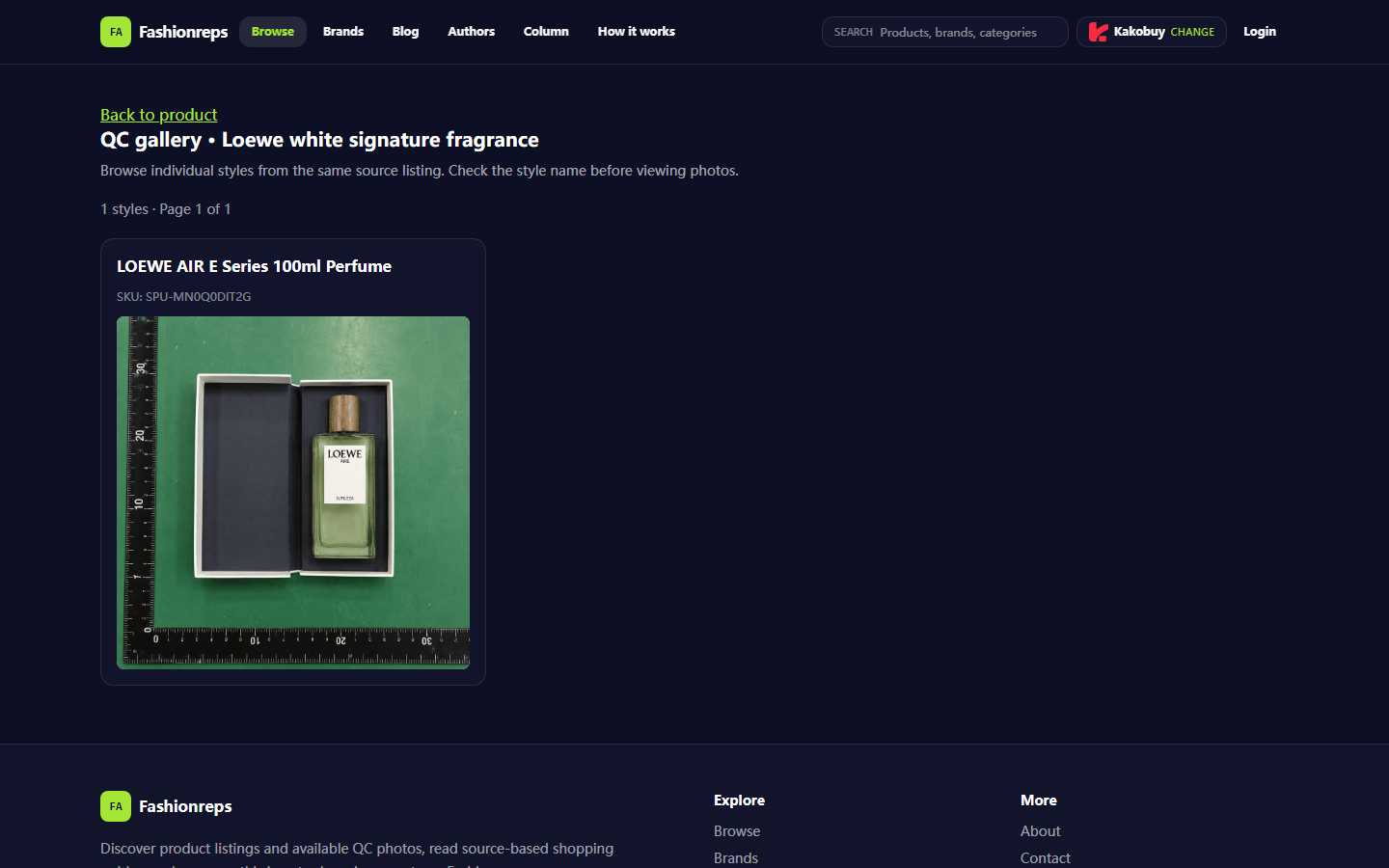
In the verification sample provided, the QC page shows the product name as "Loewe white signature fragrance," along with "LOEWE AIR E Series 100ml Perfume" and SKU "SPU-MN0Q0DIT2G." The page also prompts users to check the style name before viewing photos. This information can serve as visible page evidence, but it alone cannot prove that all images belong to the same color or same physical batch.
If the page simultaneously displays "Browse individual styles from the same source listing" or a similar prompt, treat it as a collection of multiple styles rather than a simple color option switch. 📌
Compare Main Image, Thumbnails, Color Options, and Variant Names
Don't rely only on the large image. Record each discrepancy in a fixed order:
- Check the currently selected variant name.
- Record the color, packaging, label, or appearance features shown in the main image.
- Open each thumbnail one by one to see if different colors, packaging, or product forms appear.
- Check the color option text to see if it explains the image differences.
- Record whether the main image, thumbnails, product name, and SKU change in sync after selecting a color.
- Refresh the page or re-enter the product page to confirm that the selection state hasn't been reset.
Use the following record format to avoid mistaking impressions for conclusions:
| Page Field | Currently Visible Content | Questions to Verify |
|---|---|---|
| Product Name | Loewe white signature fragrance | Does the name match the product category in the image |
| Variant Name | LOEWE AIR E Series 100ml Perfume | Is it an independent style rather than a color name |
| Image | Main image and QC photos | Do all images show the same packaging and same specifications |
| Number | SPU-MN0Q0DIT2G | Does the number change when switching styles |
| Color Information | Visible color text or options on the page | Does the text clearly correspond to the current image |
If the page has no color selector, only a style name, do not categorize different images as different colors on your own. At that point, you can only record that "images show differences, but the page does not provide enough evidence for color mapping."
Check Whether Different Images Belong to the Same Product or Different Variants
Image inconsistencies can arise from several situations, but the page appearance alone usually cannot confirm the backend cause. Common verifiable branches include:
- Different angles or lighting of the same product
- Multiple styles under the same source link
- Color options not correctly bound to image resources
- Main image from product display, QC image from another specification
- Incomplete page cache or thumbnail updates
- Product title, SKU, and image resources from different records
During verification, focus on finding mutually corroborating fields rather than guessing technical reasons. Strong evidence typically includes: identical variant name, identical SKU, identical specifications, and consistent packaging text in images. If only the color differs while all other fields are identical, you can tentatively record it as "possibly a color difference"; if even the product name, specifications, or number are inconsistent, treat it as "possibly different variants or different products." ⚠️
QC images on the page also cannot automatically prove that the product has been purchased, inspected, or received by you. They only show that the page displays a certain set of visible images. Do not write image observations as statements about touching materials, confirming authenticity, confirming stock, or confirming physical quality.
Record Page State, Update Time, and Reproducible Field Differences
Every verification should leave a reproducible record. At minimum, fill in:
- Verification date: 2026-10-21
- Destination country and planned shopping agent: if undecided, explicitly write undecided
- Browser or device environment
- Page title and URL
- Default selected style upon entering the page
- Image numbers or thumbnail order corresponding to each variant
- Differences before and after refresh
- Whether the page shows loading failures, empty images, redirects, or login requirements
- Whether support, contact, or issue feedback entry points are visible
If the page does not publicly show an update time, do not fill it in yourself. Write "Page does not show update time" and use the access date as the verification date. Page state should also use neutral descriptions, such as "Currently visible page information is insufficient to match images and colors," rather than directly asserting "website backend error." 📝
You can perform a low-risk reproduction: record the current selection, refresh the page, then re-select the same variant and compare whether the main image, thumbnails, title, and number remain consistent. Do not repeatedly refresh, repeatedly submit forms, or continuously create orders to verify the issue.
Distinguish Between Visible Page Evidence and Unconfirmable Backend Causes
What can be directly confirmed at present includes only the fields actually displayed on the page. For example, the sample page shows the product title, style name, 100ml specification, SKU, and QC photo entry. Content that cannot be confirmed from the page alone includes:
- Whether the target color is still in stock
- Whether the images come from the current seller or current batch
- Whether images and color options are bound to the same backend record
- Whether the physical item matches the display images
- Whether the agent will retain the current color after order submission
- Whether the product is authentic or has any quality guarantee
Record these two types of information separately so that when you later ask support, you won't mistake speculation for fact. ✅
If the product page does not clearly show color names, variant numbers, or corresponding images, mark the evidence level as "insufficient to place an order directly." This is not a judgment on product quality but on the completeness of page information.
Organize Specific Inquiry Content via Visible Support Entry on the Target Site
If you still wish to confirm, use the visible Contact, support, issue feedback, or related entry points on the target site page, and provide the minimum necessary information. Do not publicly share order numbers, complete shipping labels, passports, payment card information, or other personal data.
Inquiry content can include:
- Current product title and SKU
- Style name displayed on the page
- Which main image or thumbnail is inconsistent with the color text
- The specific color or style you wish to purchase
- Whether the latest images corresponding to that variant can be provided
- Whether the images on the page belong to the same product and same specification
- Which variant name should be selected in the order after color confirmation
Do not send vague descriptions like "image is wrong, please fix" that cannot be reproduced. Explain the specific differences between page fields and images, and keep a record of the submission time. Do not treat silence from support as confirmation before they reply.
Set Conditions to Stop Resubmitting and Hold Off on Ordering
Stop submitting the same issue and hold off on ordering if any of the following occurs:
- The page has no clear color or style mapping
- The same SKU corresponds to obviously different product appearances without explanation
- After switching variants, the title, images, or number change randomly
- The selected color resets after refresh with no confirmation prompt on the page
- The support entry cannot be submitted, or there is no reproducible ticket record after submission
- The support response does not clearly indicate which variant to select
- You cannot confirm that the target color, specification, and price belong to the same purchasable item
Stopping operations does not mean judging the product as unpurchasable; it means the existing evidence is insufficient to safely complete the selection. Retaining page records and waiting for corrections or clear answers is more likely to avoid color errors, duplicate charges, and subsequent refund disputes than repeatedly submitting multiple orders. 🛑
Decide Next Steps Based on Verification Results
If the product name, variant name, SKU, color text, and images correspond to each other, you can proceed to confirm price, stock, shipping, destination taxes, and return/exchange conditions. Before purchasing, still re-check on the actual shopping agent page, because fashionreps is responsible for displaying and discovering products, while orders, payments, warehouse processing, and shipping are usually handled by the selected external shopping agent.
If only some fields match but the color still cannot be confirmed, wait for support reply or page correction. Do not use the main image color as a substitute for the official variant name, and do not place an order just because a particular QC image looks closer to the target color.
If fields conflict, the page cannot be reproduced stably, or the support channel cannot confirm the specific variant, it is advisable to abandon this candidate and look for a product with more complete page information. This decision does not prove the product is defective; it only indicates that the current page cannot provide sufficient actionable evidence.
The final record should clearly state three things: what current visible evidence is, what is still missing, and under what conditions you will not proceed. This reduces the risk of selecting the wrong color and avoids mistaking a page information inconsistency for confirmed product facts.